Turnkey Websites: From Design to Self-Hosted Infrastructure
When people say «build a website,» they usually mean a page. I build the entire working system: the design, the site itself, integrations (bots, mini-apps), and the infrastructure that keeps it running — deployment, monitoring, backups, security. For the client this means a single person responsible from idea to a live, observable site — without a zoo of five freelancers pointing fingers at one another.
Below is what «turnkey» really means and how it works under the hood. In plain words for those who care about the result, and with details for those who look at the stack.
What «Turnkey» Means
The full cycle in one pair of hands: design → markup → CMS → integrations → deployment → monitoring and backup → support. You get not files but a working site on a server, with a domain, a certificate, and instructions on how to manage it.
A Site That Looks and Works the Way It Should
For you: clean and fast — on both phone and desktop.
Under the hood: semantic HTML/CSS/JavaScript markup, a custom WordPress theme (not a marketplace template), lazy image loading, minimal excess code. Smooth scrolling to sections, modal windows, galleries, code highlighting in technical blocks — all in pure frontend, without heavy libraries.
You Manage the Content Yourself
For you: edits without a programmer.
Under the hood: WordPress as the management system, custom blocks and sections, a convenient media library. Want to? Add an article, a project, or screenshots yourself.
Integrations and Automation
For you: the site isn’t a «business card» but a tool — requests, notifications, chatbots.
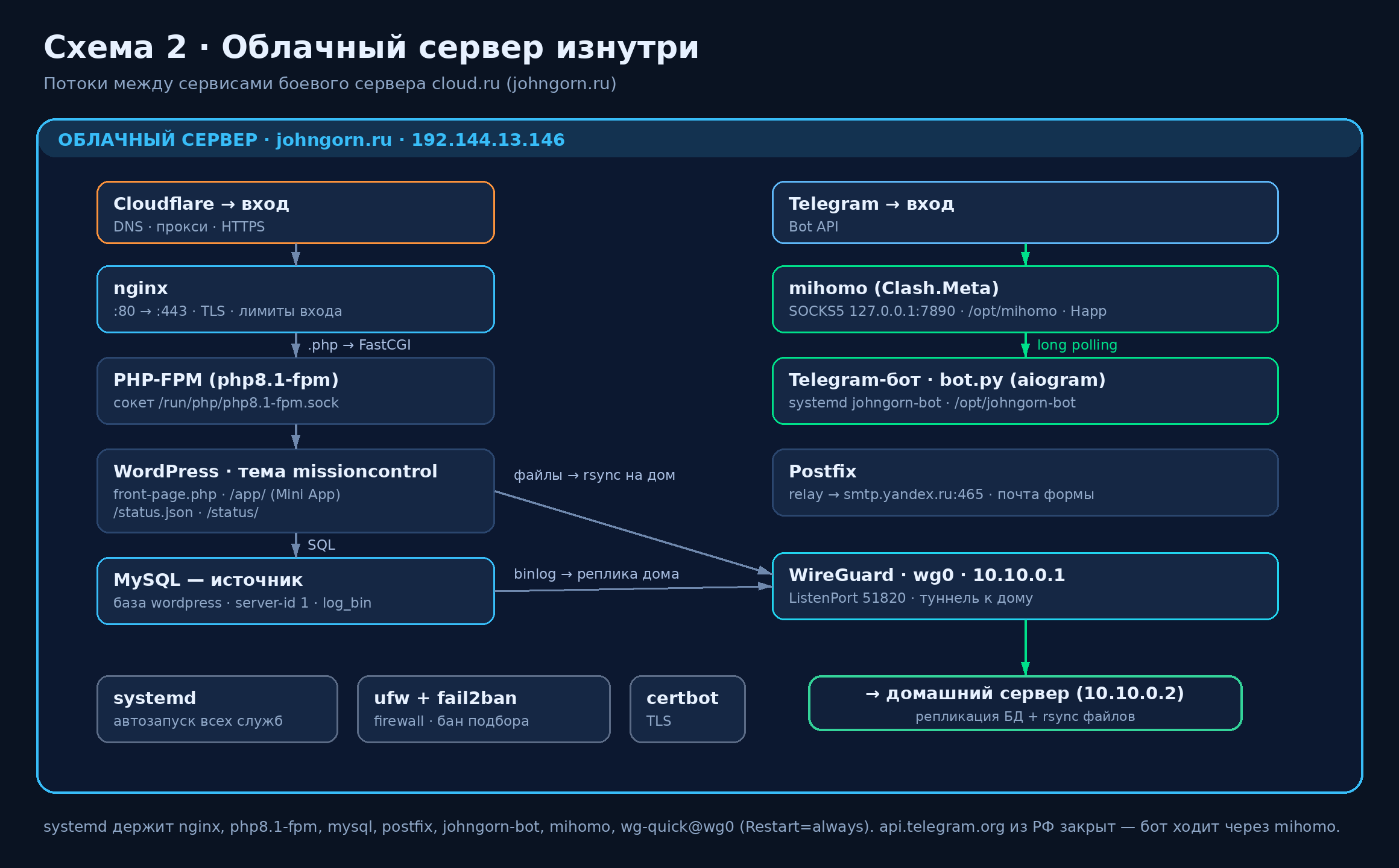
Under the hood: Telegram bots in Python (aiogram) with inline menus, deep links, and sending documents right into the chat; Telegram Mini Apps — mini-applications inside the messenger built on the WebApp SDK; forms and notifications. The bot maintains a reliable connection to Telegram through a separate proxy layer, so it works stably even where a direct connection is finicky.
Live Data and Monitoring
For you: the site shows that the services are alive — both you and the visitor can see it.
Under the hood: a status page that every few seconds pulls JSON with metrics — node availability, uptime, replication state — and updates the indicators on the fly, without reloading the page.
Reliable Infrastructure
For you: the site doesn’t go down, and if something happens, it recovers quickly.
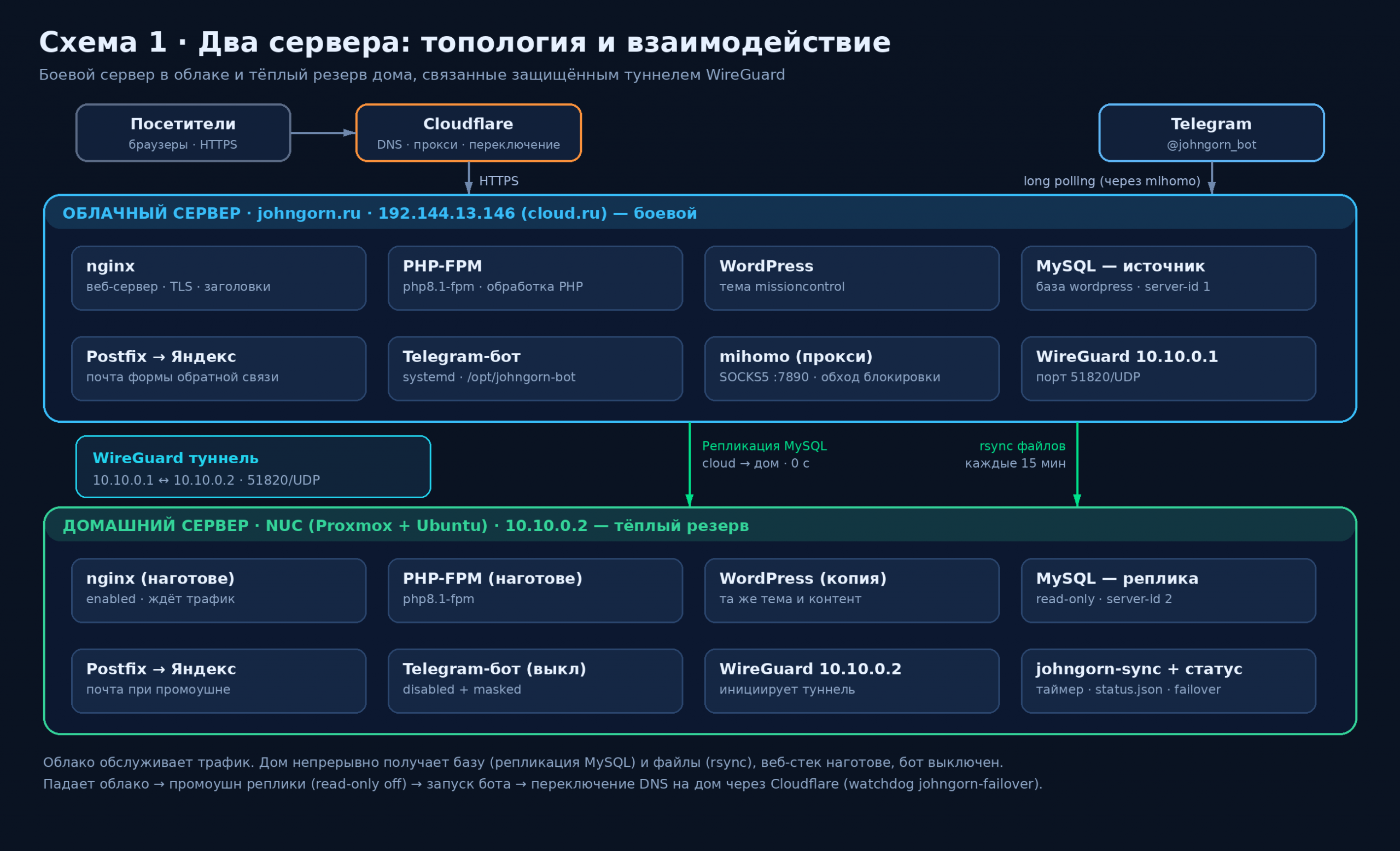
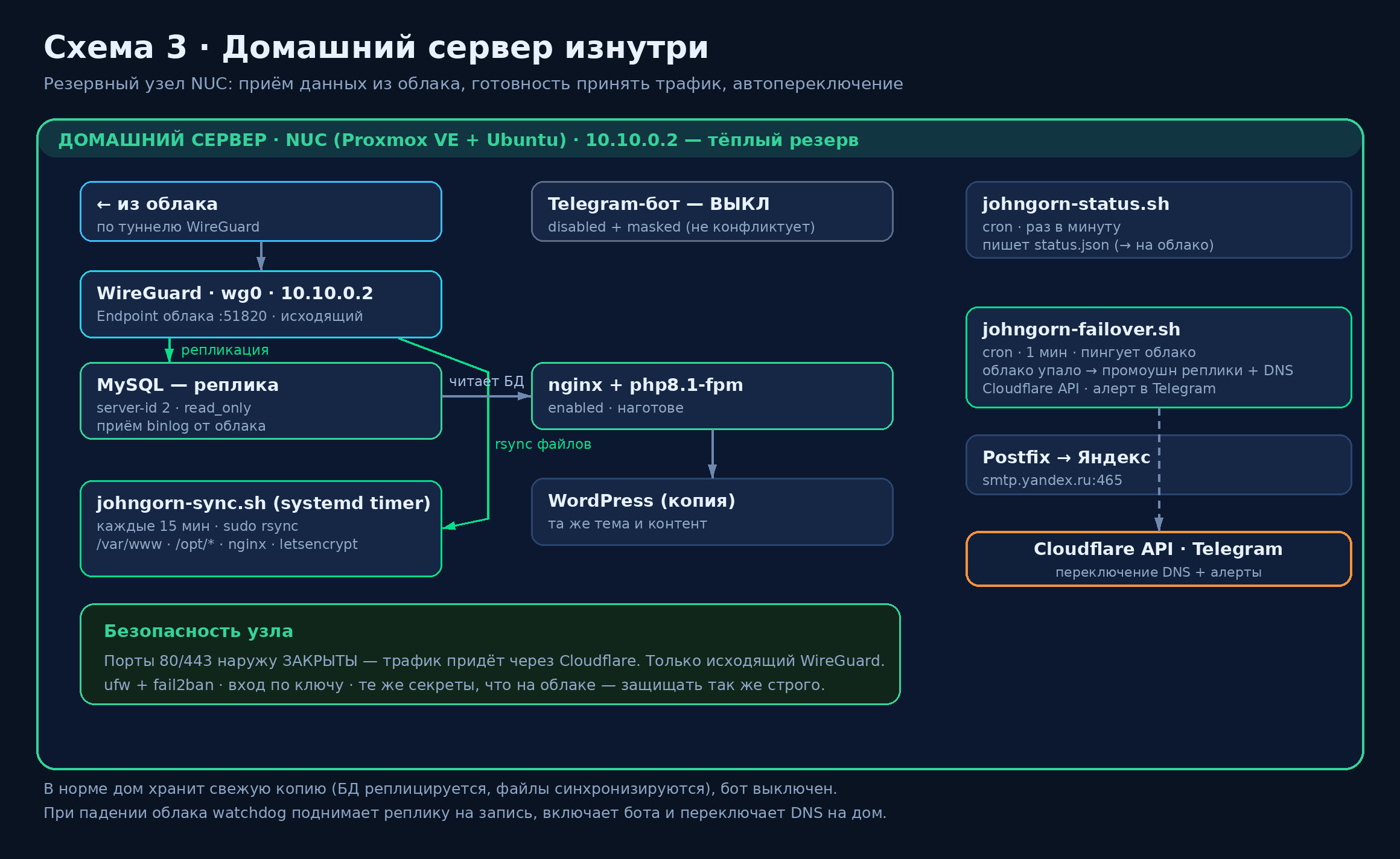
Under the hood: nginx + PHP, services under systemd with auto-restart, TLS certificates with auto-renewal. The key is fault tolerance: a production server in the cloud and a backup copy in my home lab that continuously pulls files (rsync) and the database. If the cloud goes down, there is an up-to-date duplicate ready to take the load.
Security by Default
For you: data and access are protected.
Under the hood: HTTPS, the principle of least privilege, secrets kept only on the server with correct permissions, discipline in rotating keys and passwords, careful handling of SSH access, and a private network between nodes over WireGuard.
How the Work Goes
- We figure out the task — what is needed, for whom, and what result counts as success.
- Structure and prototype — we agree on how it will look and work.
- Build — design, markup, and filling content via the CMS.
- Integrations — bot, mini-app, forms, notifications.
- Deployment — I bring it up on the server, connect the domain and certificate.
- Handover — documentation: how to change content and keys.
- Support — monitoring, backups, improvements.
The Stack, in Short
- Frontend: HTML, CSS, JavaScript, responsive markup
- CMS: WordPress (custom themes and blocks)
- Backend and bots: Python, aiogram, Telegram WebApp (Mini Apps)
- Server: Linux (Ubuntu), nginx, PHP, MySQL, systemd
- Infrastructure: WireGuard, database replication and backup, monitoring, Let’s Encrypt (TLS)
Need a Site Like This?
If you want a site that not only looks good but also works like a system — with integrations, monitoring, and backups — get in touch.
- Telegram: @johngorn0
- Portfolio bot: @johngorn_bot
- Email: johngorn@yandex.ru
A Recent Example: A Turnkey Online Store — johngorn.online
The most telling recent «turnkey» example is the video-surveillance online store johngorn.online. Built from scratch: from the catalog and design to payment processing and publishing on my own server.
- Stack: Medusa v2 (headless) + Next.js, PostgreSQL, MeiliSearch, Node.js
- A catalog of 200+ products, 66 categories, faceted filters by specifications
- A «System Builder» tool and ready-made kits for each site
- YooKassa payment processing and multiple delivery options
- Requests via Telegram and email, plus an admin panel
- Deployment to my own Proxmox server, publishing via Cloudflare Tunnel + WireGuard with no open ports
The same principle as always: one person responsible from code to a live, observable production. See it live — johngorn.online.